Placing a WorldView Radar Tasking Request: SAR
The instructions on this page apply to orders placed through the Hub user interface only. It does not apply to orders placed via the Ordering API.
You can request to task a new image, or a "collect," to support mission needs requiring Synthetic Aperture Radar (SAR) imagery. High-resolution SAR data is beneficial in a wide variety of use cases, including area of interest (AOI) monitoring, humanitarian aid and disaster relief (HADR), maritime security, battle damage assessment (BDA), and counter denial and deception (D&D).
When placing a WorldView Radar tasking request, you have access to Vantor's Virtual Constellation (VC) SAR partners. Currently Umbra is Vantor’s only SAR partner available in Hub. Your tasking order will be fulfilled at the earliest opportunity, using the VC partner satellite that best fits your selected tasking parameters.
-
Do one of the following, depending on the part of the interface you are using:
-
Select Tasking. The Tasking panel opens.
-
Areas Panel Next to the area you want to task, select the menu
 , then select Order New Collect (Single)
 .
.When placing a tasking request for SAR imagery based on an AOI, only the centerpoint of that AOI is used, regardless of the AOI size.
For all SAR Spotlight modes, only a 25 sqkm (5 x 5 km) footprint image will be delivered.
-
Viewport Right-click in any existing area (e.g., polygon, rectangle), then select Order New Collect.
The Tasking wizard opens.
-
-
Complete each page of the WorldView Tasking wizard to define the parameters in your tasking request.
 General
-
Make basic selections for your tasking request.
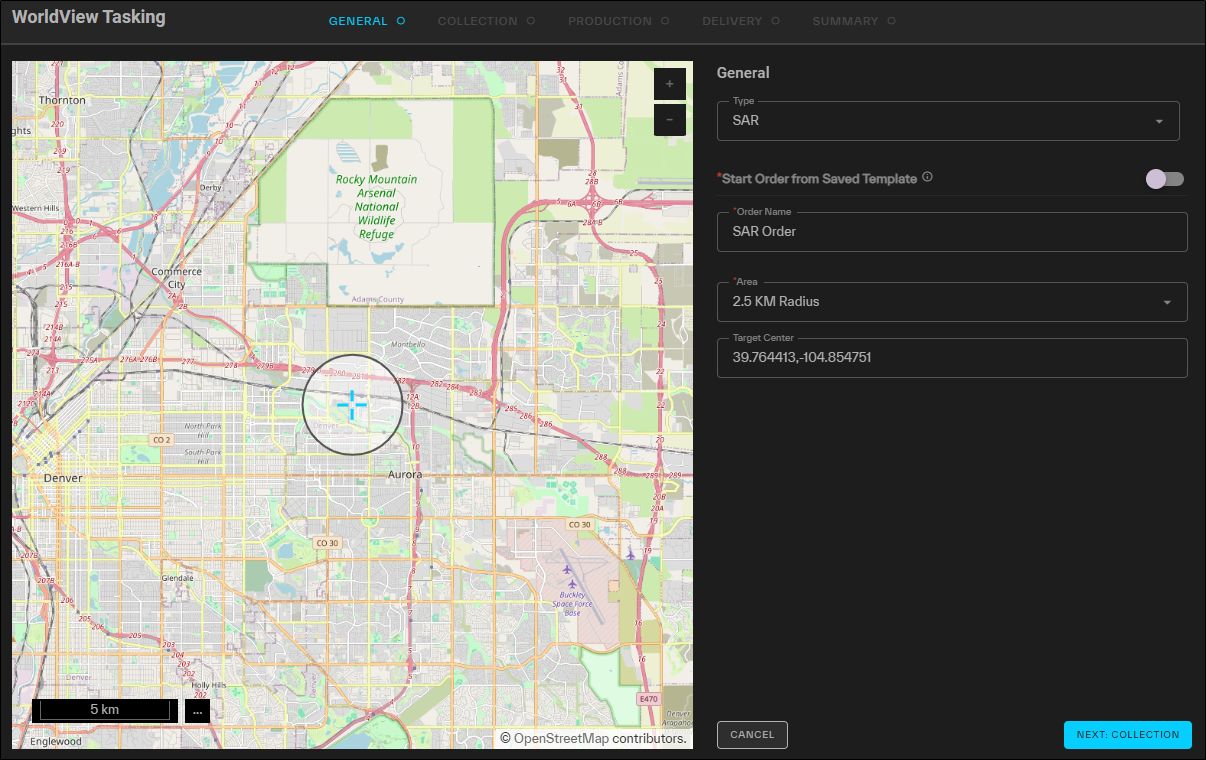
The General step for tasking requests.
- Type Select SAR.
-
Start Order From Saved Template (Optional) If you want to use a previously saved template for the order, select Start Order From Saved Template, then select a template from the from the Select Template drop-down.
When using a template, be sure to verify all fields as you progress through the wizard, as some selections may not be included in the template. For example, you are still required to select an area and set the collection window, even when you are using a template. You can also edit the pre-populated selections in a template, so reviewing each field allows you to make one-off changes as needed.
To clear a template selection and reset all fields, select
 .
. -
Order Name A name for the order.
-
Area From the drop-down, select the area you want to use for your tasking order. You can select a 2.5 km radius circle or a saved area.
SAR orders default to a 2.5 km radius circle in the center of the viewport, representing the core area of the image footprint that will be delivered. You can drag this area to reposition it.
The delivered footprint will be a 5 x 5 km square, with rotation depending on the exact collection geometry.
-
Target Center If you selected a 2.5 km radius circle area, enter the target's center coordinates.
-
Select Next: Collection.
Collection
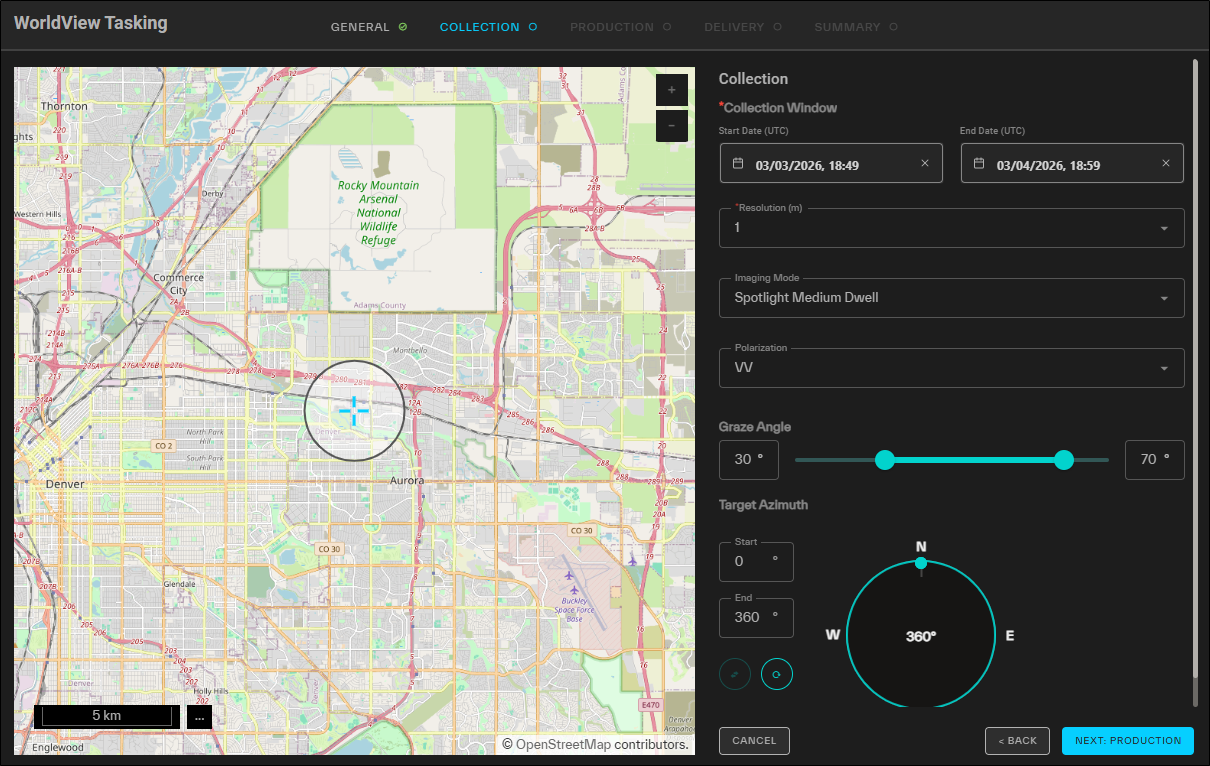
The Collection step for tasking requests.
-
Expand each parameter drop-down to define your desired collection parameters.
-
Collection Window Use the calendar picker to set the collection start date.
-
Resolution The minimum distinguishable distance between two objects in an image. For SAR, this is defined by the radio frequency pulse's impulse response (IPR) at 3DB from the peak. It is roughly equivalent to electro-optical (EO) ground sample distance (GSD).
Your selection automatically adjusts the graze angle.
-
0.25 m
-
0.35 m
-
0.5 m
-
1 m
-
Imaging Mode Select the desired SAR imaging mode.
-
Spotlight Single-Look
-
Spotlight Medium Dwell
-
Spotlight Long Dwell (not available with 1 m resolution)
More Information
Vantor uses “dwell” to define azimuth resolution in complex imagery: longer dwell times produce finer native azimuth resolution but increase imaging duration. Single-look orders collect one look with azimuth resolution equal to the ordered range resolution. Medium- and long-dwell SLC data have finer (asymmetric) azimuth resolution, while DI and CSI products are multilooked to near-square pixels, reducing speckle (graininess) and improving visual quality. Single-look modes have the highest speckle and greatest collection density per pass, whereas long-dwell modes provide the most speckle reduction but cover fewer targets per pass due to longer imaging times.
-
-
Polarization Orientation of the plane in which transmitted electromagnetic waves oscillate. The first letter refers to the transmission orientation and the second letter refers to the reception orientation. H stands for horizontal, and V stands for vertical.
Options
-
VV (default) Vertical transmission and vertical reception
-
HH Horizontal transmission and horizontal reception
For Umbra, HH has reduced collection feasibility than VV, due to satellite configuration.
Objects may differ in appearance in VV or HH, depending on their relative orientation to the SAR sensor.
Vertically oriented objects, like towers, are typically more easily distinguishable in VV imagery. Horizontally oriented objects, like fences and power lines, are more easily distinguishable in HH imagery. Wave returns tend to be reduced in HH over water, thereby improving ship detection; however, wakes tend to be more distinguishable in VV.
-
- Graze Angle (10° – 80°; default range varies with resolution) The angle between a local ground plane and a vector to the satellite at the scene center point, as projected onto an elevation-inflated ellipsoid.
Default minimum and maximum graze angles are automatically set when you select a resolution. The default range maximizes access opportunities while maintaining generally acceptable image quality. However, you can adjust the value using the double-ended slider.
High graze angles will result in higher quality images, larger layover effects, and fewer access opportunities. Low graze angles will result in lower quality imagery and larger shadowing effects, but more collection opportunities.
To maintain the quality of your product, we recommend not decreasing the minimum graze angle below the default unless you have a specific reason to do so and accept the quality impact.
The minimum allowable graze angle is 10 °. Some resolutions also have set maximum graze angles; for example, the maximum graze angle at 0.25 m resolution is 60°.
-
1.0 m 30° – 70°
-
0.5 m 40° – 70°
-
0.35 m 45° – 70°
-
0.25 m 50° – 60°
-
Target Azimuth (0° – 360°) The allowable range of the azimuth of the target. Azimuth is measured from north in clockwise degrees.
In the Start and End fields, enter your desired values, or drag the double-ended slider along the compass to set the values.
To swap the Start and End values, select
 .
.To reset the Start and End values, select
 .
.SAR imagery collection is not possible at nadir or along the satellite’s ground track. Umbra’s satellites are all currently in sun synchronous orbits, so northerly (~325° – 35°) and southerly (~145° – 215°) collection azimuths are not generally feasible over most of the globe. Setting target azimuth constraints in these ranges may result in no collection feasibility.
Options
Finer resolutions have narrower "good quality" fields of regard, and will have fewer collection opportunities.
Default graze ranges have been established to balance between signal to noise ratio, layover, and access opportunities.
Those defaults are:
Graze angles lower than these defaults may have poor signal to noise ratio, and graze angles above these defaults may have excessive layover effects for certain targets.
-
-
Select Next: Production.
Production
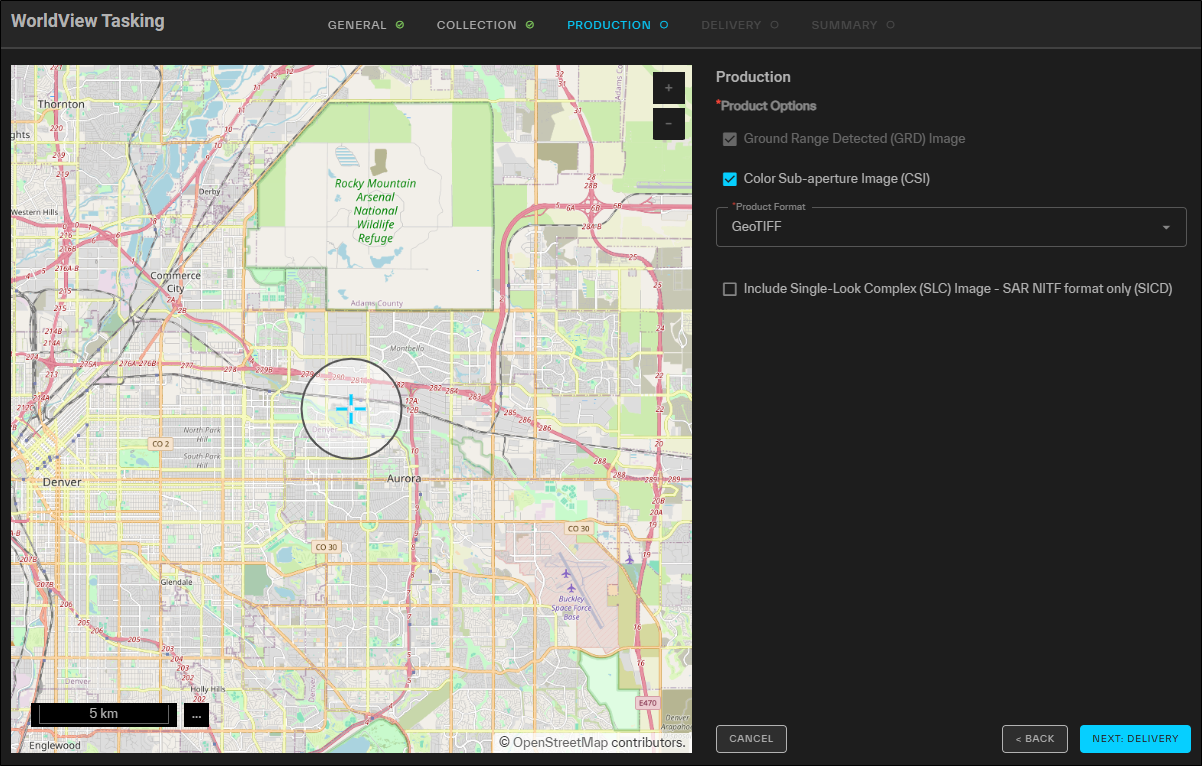
The Production step for tasking requests.
-
For each option, define your desired production parameters.
-
Product Options Select one or more product options for the detected image type.
Options
-
Ground Range Detected Image (GRD) (default; always delivered)
-
Color Subaperture Image (CSI) Optionally available only with SAR Spotlight Medium Dwell & Long Dwell collection modes.
-
-
Product Format Select your desired product format. Available formats are dependent on your Product Options selections.
Options
-
SAR_NITF Detected imagery will be delivered in NGA SIDD NITF format with embedded rigorous projection model.
-
GeoTIFF Detected imagery will be delivered in TIFF format with embedded RPCs.
-
-
Include Single-Look Complex (SLC) Image Optionally available; only available in NITF format as an NGA SICD NITF.
-
-
Select Next: Delivery.
Delivery
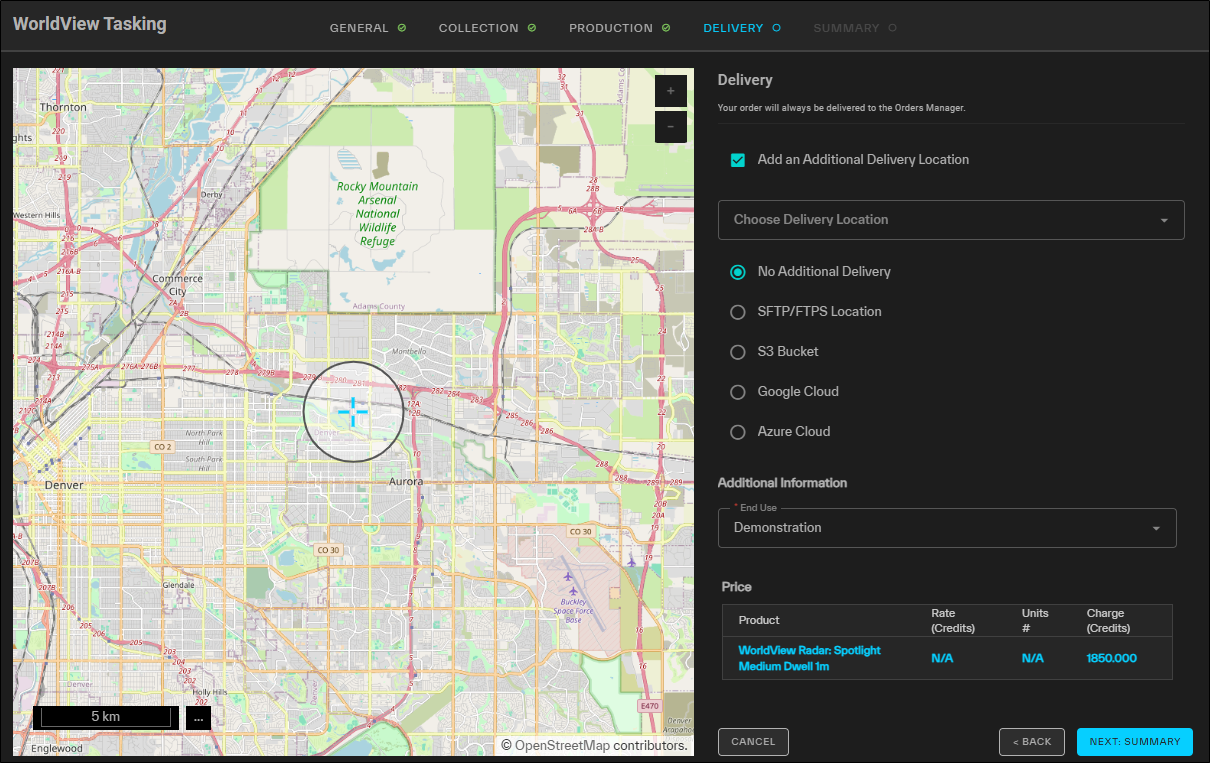
The Delivery step for tasking requests.
-
For each option, select your desired delivery parameters.
-
Add an Additional Delivery Location (Optional) Select an additional file transfer location for delivery of the tasked imagery.
Tasking requests are always delivered to the Orders Manager. Selecting an additional delivery location is optional.
Options
-
Choose Delivery Location Select from saved locations.
-
No Additional Delivery (Default)
-
STFP/FTPS Location
-
Select your protocol, then enter your credentials, host, port, and directory.
-
To verify the connection, select Test Connection.
A successful connection test is required to save the location and to
-
(Optional) To save the location to use again later, select Save as Location. The location is added to the Choose Delivery Location drop-down.
-
-
S3 Bucket
-
Enter your S3 bucket, folder, region, IAM access key, secret access key, and optional session token.
-
Use the Session Token field if you have a temporary STS token.
-
For regular access keys, leave the Session Token field blank.
Be aware that STS tokens are valid for a maximum of 12 hours. As such, STS tokens are best suited for manually sending an order to an additional location after the initial order has been completed.
Your S3 bucket must be in the AWS commercial cloud.
-
-
To verify the connection, select Test Connection.
A successful connection test is required to save the location and to
-
(Optional) To save the location to use again later, select Save as Location. The location is added to the Choose Delivery Location drop-down.
-
-
-
Enter your service key, bucket, and folder.
To select a service key from a location on your computer, select the paperclip
 .
. -
To verify the connection, select Test Connection.
A successful connection test is required to save the location and to
-
(Optional) To save the location to use again later, select Save as Location. The location is added to the Choose Delivery Location drop-down.
-
-
-
Enter your connection string, bucket, and folder.
-
To verify the connection, select Test Connection.
A successful connection test is required to save the location and to
-
(Optional) To save the location to use again later, select Save as Location. The location is added to the Choose Delivery Location drop-down.
-
-
-
End Use From the drop-down, select the end use that is appropriate for your tasking order.
-
-
Select Next: Summary.
Summary
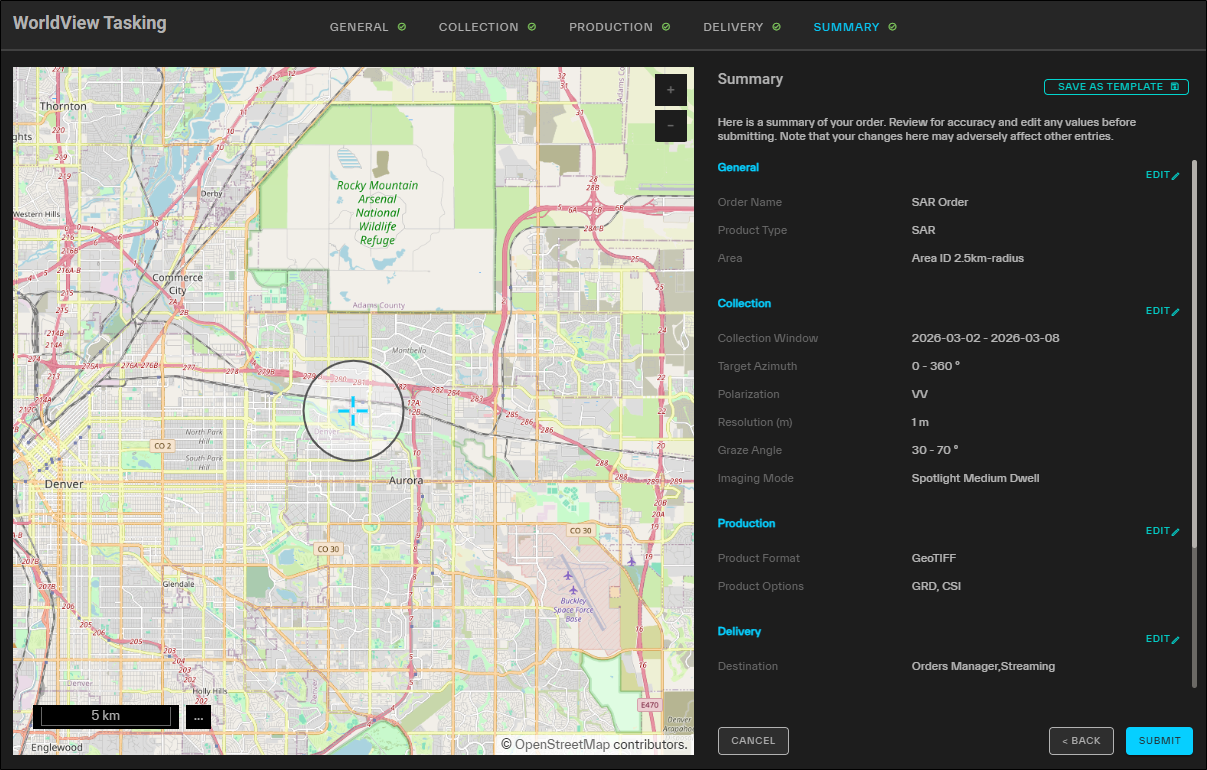
The Summary step for tasking requests.
A summary of your order displays the parameters you selected for your tasking request.
-
Do one of the following:
-
Place the Request Select Submit. A confirmation appears.
-
Make Changes Next to any section, select Edit.That section of the wizard opens so you can make changes.
Making changes may affect parameters on multiple pages of the tasking wizard. Be sure to check each page for any updates before you submit your request.
-
As you make and update selections in the Tasking panel, the Price section at the bottom of each page of the wizard displays a real-time quote.
If you want to save your tasking request as a template to use later, select Save As Template. See Using WorldView Tasking Templates.
-
-
After placing the order, a final confirmation displays your order number and the total number of credits charged. Do one of the following:
-
Close the Wizard Select Close.
-
Open the Orders Panel Select View Order. See Orders.
-
Place a New Tasking Request Select New Tasking Order.
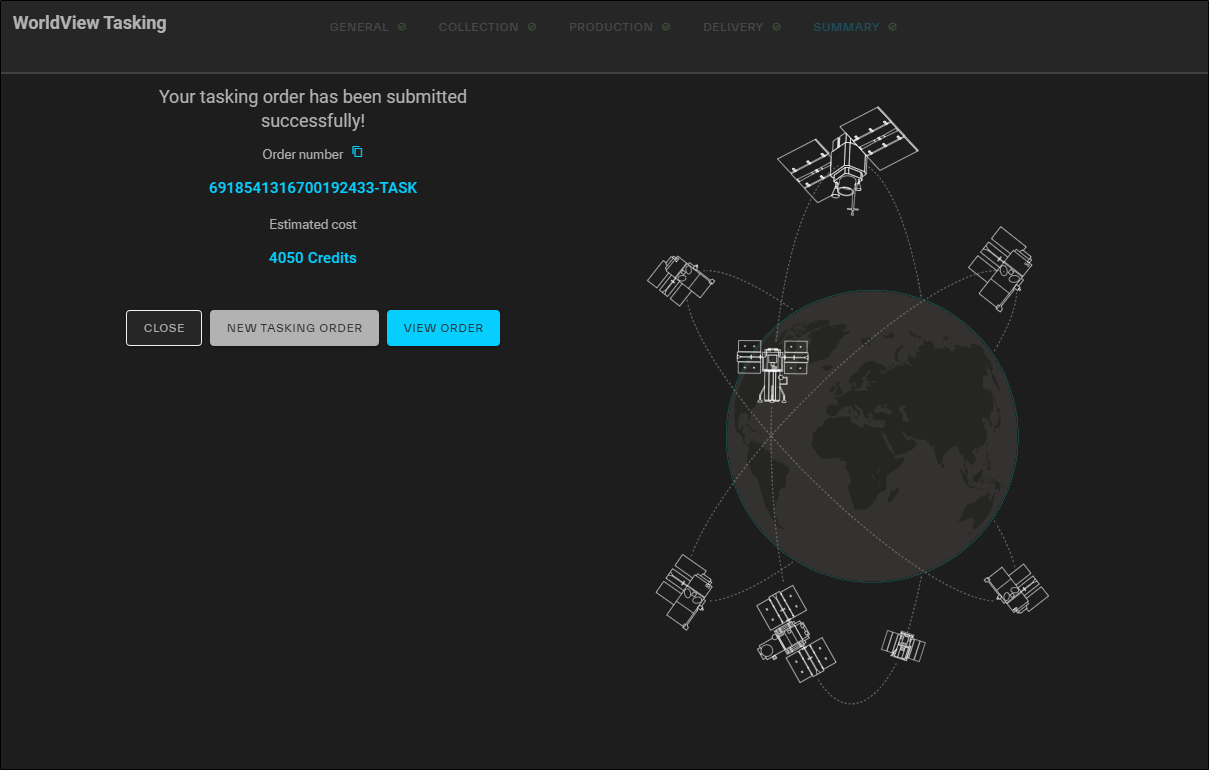
The Confirmation page for tasking requests.
-
More About Tasking
-
WorldView Radar tasking currently always results in only a single scene being collected and delivered.
-
Tasking request scheduling and satisfaction are based on a number of factors, such as the specific order parameters, length of collection window, and regional competition or demand. Tasking requests use an escrow system rather than metering the quoted number of credits against your credit plan limit upon placing the order.
-
Tasking request scheduling and satisfaction are based on a number of factors, such as the specific order parameters, length of collection window, and regional competition or demand. Tasking requests use an escrow system rather than metering the quoted number of credits against your credit plan limit upon placing the order.
Upon acceptance of your tasking quote, the quoted number of credits are placed in escrow. The credits in escrow are metered against the credit plan limit after each successful collect (or partial collect). If your tasking time window expires and you have credits remaining in escrow, these credits are released.
To see how many credits you have in escrow, open the Orders panel. From the Order Type drop-down, select Tasking. The Total Pending Charges (displayed at the bottom of the page) show your current credits in escrow.
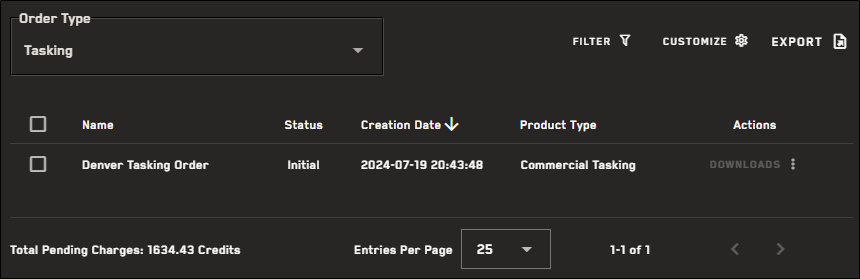
Your Total Pending Charges show how many credits are currently in escrow.
-
If your tasking request is denied, contact support@vantor.com.
-
For more information about tasking statuses, please see Tasking Statuses.