Publishing a Source Package
You can publish a source package to stream a project's selected images and stacking order into ArcGIS Pro and ArcMap, using the Vantor ESRI plugins. By using a source package, you ensure consistent stacking order and imagery when viewing the project in different tools, which helps to facilitate mapping activities.
-
Select Projects. The Projects panel opens.
-
Select the Project Menu
 , then select Publish Source Package.
You can select the Project Menu
from the main Project panel or from the expanded Projects interface. See Overview: Projects.The source package ID displays.
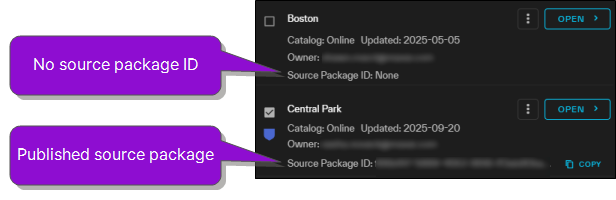
The Source Package ID field only displays a value if the project has been published; otherwise it displays None.
-
To copy the source package ID for use in ArcGIS Pro or ArcMap, select Copy.
To import into a specific ESRI platform, follow the relevant Vantor Hub Developer Portal guide below.
Source packages are children of projects. Each source package ID is associated with the image selections in the project at the time that you publish the source package.
If you change the imagery selections in the project, be sure to republish the source package ID to capture the most recent version of the project.