Hub 1.8.0
Capabilities
The following capabilities are part of Hub version 1.8:
New Vivid Terrain Products
New products have been added to Vivid Terrain.
| Name | Description | Category |
|---|---|---|
| Vivid Terrain - Digital Terrain Model (DTM) | Describes the elevation of the bare earth in a raster format. It is based on the Vivid Terrain Digital Surface Model (DSM) with trees and man-made objects (e.g., houses) removed by automated processing. The data represents the average elevation in the Post Spacing area. | Surface & Terrain Models |
| Vivid Terrain - Digital Surface Model (DSM) | Describes the elevation of the earth surface in a raster format. The data represents the average elevation in the Post Spacing area. | Surface & Terrain Models |
| Vivid Terrain - Elevation Bundle | Includes Vivid Terrain Digital Terrain Model (DTM) and Vivid Terrain Digital Surface Model (DSM). | Surface & Terrain Models |
| Our most accurate representation of Earth in 3D with textures on all sides. | Texture 3D Mesh | |
| A seamless true orthographic projection of Earth with the texture (natural color) in a raster format. | Derived Capabilities | |
| Includes Vivid Terrain 3D Surface Model (3DSM), Vivid Terrain Digital Surface Model (DSM), and Vivid Terrain True Ortho. | Texture 3D Mesh | |
| Describes the footprint and superstructures of buildings in a vector format with height attribution for a 3D representation. The vectors are automatically extracted from the Vivid Terrain 3D Surface Model. | Derived Capabilities | |
| Describes the type of terrain class in a raster format. This type of product is sometimes referred to as land use/land cover or clutter classification data. The classification data is automatically extracted from the Vivid Terrain 3D Surface Model. | Derived Capabilities | |
| Describes the above-ground difference between the Vivid Terrain DSM and Vivid Terrain DTM in a raster format, including buildings and vegetation which were removed in the process of creating the Vivid Terrain DTM. | Surface & Terrain Models | |
| Describes the earth's surface form and texture (natural color) in industry standard point cloud formats. | Surface & Terrain Models | |
| Describes the vegetation footprint in a vector format with height attribution for a 3D representation. The vectors are automatically extracted from the Vivid Terrain 3D Surface Model. | Derived Capabilities | |
|
Vantor's on-demand suite of three-dimensional surface mesh, elevation, and true ortho products that correspond to specific collection dates. WorldView 3D leverages photogrammetric stereo collections that are correlated and enhanced by Vantor’s global Vivid Terrain 3D Surface Model.  WorldView 3D 3DSM WorldView 3D 3DSM
WorldView 3D 3DSM consists of a TIN mesh, which describes the form of the surface of the Earth, and an associated texture, which describes the appearance of the surface, either as panchromatic or natural color, depending on sensor used for image collection. The density of the mesh is irregular, with a higher density in areas and surfaces that are more complex, and sparser in areas that are flat. All other WorldView 3D data products are derived from the WorldView 3D 3D surface model. This assures that there is nearly zero alignment error between the different WorldView 3D data products. WorldView 3D DSM
WorldView 3D DSM describes the elevation of the Earth’s surface in a raster format. The data represents the average elevation in the post spacing area. WorldView 3D Bundle
WorldView 3D Bundle includes WorldView 3D 3D Surface Model (3DSM), WorldView 3D Digital Surface Model (DSM), and WorldView 3D True Ortho. The WorldView 3D True Ortho describes the texture (panchromatic or natural color) of a seamless true orthographic projection of the Earth in a raster format; it is only available as part of the WorldView 3D Bundle. |
N/A | |
| Raptor Vivid Terrain - 3D Surface Model (3DSM) |
Wide-area 3D baseline enabling consistent, vision-based geolocation and terrain mapping across full mission regions. Encrypted for Raptor. Limited access. |
Wide Area Basemap |
| Raptor Vivid Terrain - WorldView 3D On-Demand Production |
Targeted, customer-driven, date-specific 3D data for improved geolocation and terrain registration in change-sensitive areas. Encrypted for Raptor. Limited access. |
On-Demand Terrain |
Product accuracy shown above is measured at 0.5 m post spacing.
Object Detection Ordering
You can now use Hub to view and order object detections in several ways. You can order object detections for a single image, multiple images, or specific area of interest. You can also monitor an area of interest for new object detections prior to placing an order.
Vantor's Artificial Intelligence/Machine Learning (AI/ML) object detection offerings leverage advanced artificial intelligence and machine learning technologies to provide precise and efficient object detection across various domains. The robust models are designed to identify and classify a wide range of objects, including aircraft, vehicles, vessels, construction equipment, and military equipment. By utilizing high-resolution satellite imagery and sophisticated algorithms, Vantor's object detection solutions enable enhanced situational awareness and decision-making for clients in defense, intelligence, commercial, and humanitarian sectors. These capabilities support critical operations such as monitoring, security, asset management, and disaster response, ensuring reliable and actionable insights in real-time.
See Ordering Object Detections, Ordering Object Detections for an Area, and Monitoring Areas.
Enhancements
The following enhancements have been added in version 1.8:
Elevation
As you zoom and pan around the viewport, you can view the elevation at your cursor's current location in the viewport. You can also copy your elevation to the clipboard.
See Viewing Elevation.
Ingest to Streaming Enhancements
When placing an archive order using Ingest to Streaming, various ordering parameters have been updated to improve the user experience.
Status Dashboard
The new status dashboard is now live. Bookmark this page and use it to check for service outages and service issues. Login credentials are required.
A link to the status dashboard is also available in the footer of the Hub Online Help.
The previous version of the status page has been retired and will no longer be updated.
Online Imagery Alerts
You can now create an area monitor to alert you when new online imagery acquisitions intersecting an area become available in Hub. Alerts were previously only available for archive imagery catalog.
See Monitoring Areas.
Orders Panel Updates
When viewing the Orders panel, orders more than two weeks old now display in red text. Hover over the clock icon  to see an order's expiration date. If an order has expired, please place a new order.
Additionally, Product Type details are now available in the Orders panel.
Tasking Enhancements
When placing a tasking request, you now have access to all of Vantor's electro-optical (EO) satellites, including WorldView Legion. Your tasking order will be fulfilled at the earliest opportunity, using the satellite that best fits your selected tasking parameters.
When selecting your desired ground sample distance (GSD), the satellite is automatically selected from the following options:
-
50 cm (default GSD) WorldView-1 (pansharpened imagery only), WorldView-2, WorldView-3, GeoEye-1, WorldView Legion
-
30 cm WorldView-3, WorldView Legion
Additionally, the minimum order quantity for tasking is now 64 sqkm. In low-demand areas, the minimum order quantity is 50 sqkm.
Time of Day Filter
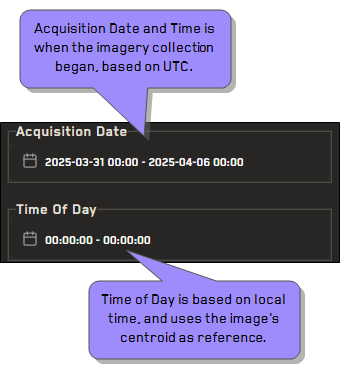
Time of Day filters have been added. Time of Day uses the image’s centroid as the reference. This is different from the time setting used in the Acquisition Date filter, which uses collection time (based on UTC). See Filtering Imagery.
More Information: Acquisition Time vs. Time of Day
The determination for time of day is divided by the 25 nautical time zones, not administrative local time.
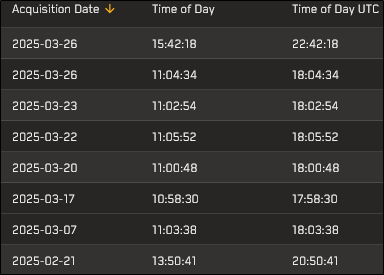
In this example, the Acquisition Date filter identifies imagery with a collection start time between 2025/03/01 and 2025/04/06, beginning at 00:00:00 UTC and ending at 00:00:00 UTC. The Time of Day filter also identifies imagery collected on those dates with a local time between 00:00:00 and 00:00:00.
The following image shows several image results from this filtered search. Notice the difference in the collected time (Time of Day UTC) and the local time (Time of Day) for each image.
User Stacking Profiles
In addition to sorting imagery using standard metadata filters, you can now also apply stacking profiles. Stacking order determines the order that imagery displays in the viewport and the Imagery panel. By default, images are stacked with the most recent image on top, and older images beneath it in descending date order.
Stacking profiles apply a set of pre-defined conditions (a "profile") to sort imagery, while general sort options are based on single image metadata values. These options are available from the Sort  menu in card or list view.
Vivid Advanced 15cm Ordering
Ordering is now available for Vivid Advanced 15 cm HD.
Documentation Updates
The following updates have been made to the documentation in version 1.8:
-
Enhanced Search and Glossary Searching for selected terms and phrases displays a new sidebar with helpful definitions and information.
Additional terms, content, and enhanced search functionality are planned for future documentation releases.
-
Example API Collection Updated The Vantor API Example Collection was created using the API client "Bruno". Bruno is a free, open-source API client that runs locally and does not save credentials or data to a cloud environment. You can import this collection into other API clients, but it may require some modifications.
Please update your bookmarks to the new API Example Collection URL: https://developers.vantor.com/docs/developer-tools/api-collection.
See Developers.
-
New Imagery Visualizations Some locations in the documentation now use comparison visualizations to show the difference between two images, rather than using two separate images. You can see some examples of these new visualizations in Exploiting Imagery, where they show differences between exploited and non-exploited imagery.
Additional imagery visualizations are planned for future documentation releases.
-
Version Updates for Vivid Terrain Products The following version updates have been made to Vivid Terrain products:
-
Cesium 1.0 has been updated to Cesium 1.1
-
13S ESRI 1.6 has been updated to 13S ESRI 1.8
See Available Vivid Terrain, WorldView 3D, and Raptor Products.
-
Known Issues
The following is a known issue in version 1.8:
-
Ordering an online image will only work if the image is exploitable. You can use Request to Exploit to make an image orderable. Trying to order an image that is not exploitable may not complete.
Bug Fixes
The following defects have been fixed in version 1.8:
-
Resolved an issue where order status updates were not being sent to users.
-
Resolved an issue where Vivid Advanced 15 cm could not be ordered via the UI.
-
Resolved an issue where metadata was not available for certain archive images.
-
Updated the maximum AOI size for Vivid Standard orders to 500,000 sq km